Case template administration
Users with the "Can edit case templates" privilege can create and edit case templates in the "Case templates" window. Click on Case Templates on the "Settings" ribbon in the main window to open the window.

In the "Case templates" window, it is possible to create, edit, and delete case templates as well as import or export them to and from F2. The window provides an overview of existing case templates, which can be sorted by columns.
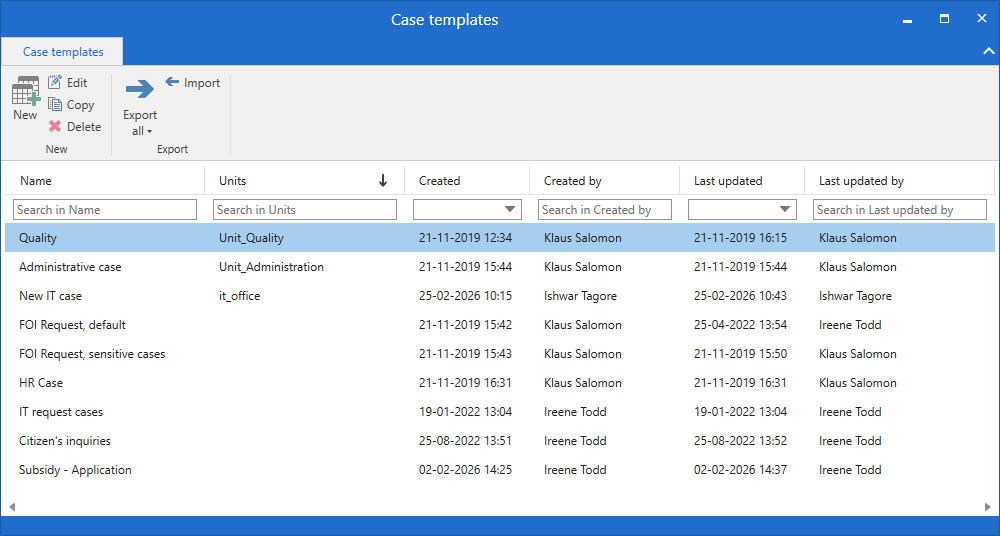
Functions in the "Case templates" window
The "Case templates" window contain menu items for working with case templates.
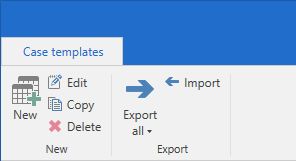
The functions are described in the table below.
| Function | Description |
|---|---|
New |
Create a new case template. |
Edit |
Edit a case template. Opens the "Edit case template" window from which you can edit the same fields as in the "New case template" window. |
Copy |
Copy a case template. First, enter a title for the new case template. The "Edit case template" window then opens from which you can edit the copied case template before saving. The "Edit case template" window contains the same fields as the "New case template" window. |
Delete |
Delete the case template. |
Export all |
Open a drop-down menu where you can choose between:
Each case template is exported as a configuration file. |
Import |
Import one or more case templates from a location outside of F2. If you are importing a case template whose title is already in use, you must enter a new title before it can be imported to F2. |
Columns in the "Case templates" window
The following columns are available in the "Case templates" window. Below each column header is a field that you can use to filter the list of case templates.
| Column | Description |
|---|---|
Name |
The case template’s name. |
Units |
Units attached to the case template, if any. |
Created |
When the case template was created. |
Created by |
The name of the user who created the case template. |
Last updated |
When the case template was edited last. |
Last updated by |
The name of the user who last edited the case template. |